

What happened, and what should you do first?
PHP2Shell is the name commonly used for two critical PHP runtime vulnerabilities: CVE-2026-109618 and CVE-2026-109619. They concern memory handling inside PHP and can permit unauthenticated remote code execution. The emergency fixes released on 21 October 2026 are PHP 8.2.35, 8.3.36, 8.4.27 and 8.5.12, in their respective branches. Both vulnerabilities were announced with a CVSS v4.0 score of 9.2. Check the first maintainer advisory and second maintainer advisory against your deployment.
Start by finding the PHP runtime that actually handles web traffic, obtaining the appropriate patched package or container image, replacing the running workers, and recording verification evidence. A successful package installation alone is not enough: a forgotten pool, old replica or second server can continue to handle requests.
Important 24 October review note: PHP published a separate session-upload-progress notice on 23 October, associated with CVE-2026-115560. Do not present the emergency release as resolving every subsequent PHP issue. The later notice has narrower configuration conditions, explained below. This guide separates confirmed advisory facts from Keen Systems' operational recommendations. It is a dated technical briefing, not a claim that every PHP site has been compromised.
For business owners, assign one technical owner and one operational contact now. Ask for the public hostname, server or container identity, runtime evidence, patch source, maintenance window and recovery plan. For engineers, preserve logs before restarting or rebuilding if there are signs of intrusion. These parallel workstreams prevent a fast patch from erasing information needed to investigate an earlier compromise.
Affected versions and the fixed-version checklist
| PHP branch | Original pair fixed in | Required evidence |
|---|---|---|
| 8.2 | 8.2.35 | Patched upstream build or vendor-confirmed backport |
| 8.3 | 8.3.36 | Check every web worker and installed extension set |
| 8.4 | 8.4.27 | Confirm the running FPM/Apache/container runtime |
| 8.5 | 8.5.12 | Also review the separate October 23 session notice |
| Older branches | No general supported-upstream release guarantee | Obtain explicit vendor coverage or migrate |
Within each listed upstream branch, earlier releases need remediation for the original pair. Later versions should still be checked for new advisories; this table is a minimum baseline for these two CVEs, not a permanent recommendation to pin those exact releases forever. A vendor may supply a security backport without changing the upstream-looking part of its package number. Therefore, a simplistic scanner comparison can misclassify a patched distribution package.
For example, Ubuntu USN-8948-1 identifies corrected package revisions for its supported distributions, including PHP packages whose displayed base versions differ from the upstream table. Match the entire package revision, repository and operating-system release to the notice. Do not compare an Ubuntu package with a third-party repository's numbering scheme, or assume a package intended for one Ubuntu release is safe to install on another.
Build a per-runtime record rather than a single company-wide yes/no field. Include the hostname, operating system, SAPI, package revision or image digest, PHP extensions, config location, patch evidence and restart time. Give each exception a named owner and a deadline. If you cannot identify who supplies security updates for a legacy installation, treat that uncertainty as an unresolved risk rather than marking the server compliant.
How the two vulnerabilities work
CVE-2026-109618: invalid state during out-of-memory cleanup
PHP can abandon request processing with longjmp() when an allocation fails. The first advisory describes paths where request data becomes reachable before initialization has finished. An early exit can leave that data inconsistent; shutdown code may subsequently interpret it as valid. This is why a memory-exhaustion event can have a more serious outcome than a clean request failure. The maintainer report also explains that multipart processing can amplify memory consumption, so an apparently reasonable request-size setting is not proof of safety.
The OOM fix changes how allocation failure is handled: a soft failure is deferred to a virtual-machine safe point, while a higher hard threshold terminates the process immediately. This prevents normal cleanup from interpreting partially initialized state and preserves PHP's ability to limit request memory.
CVE-2026-109619: request memory outlives its intended lifetime
The second problem involves worker-global state referring to memory belonging to a completed request. If cleanup leaves a reference behind, a later request in the same worker can encounter it before normal initialization replaces it. This creates a use-after-free condition. The maintainer advisory distinguishes an operation that leaves the stale state from a later operation that consumes it. Memory layout and the reachable processing path influence whether an attempt crashes or achieves code execution.
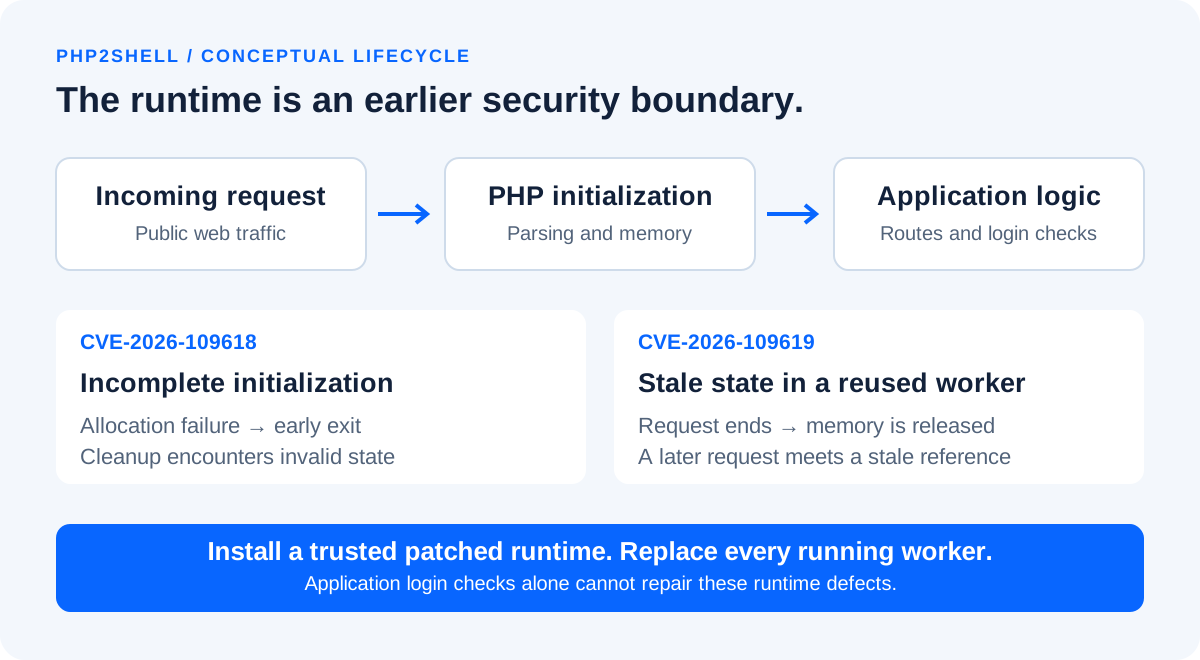
For defenders, the useful distinction is between application authorization and runtime request handling. Your login page, framework middleware, form validator and route permissions are only effective after control reaches them. A runtime defect on an earlier path is not repaired by adding another application login check. Likewise, moving a button or hiding an upload form does not establish that the underlying server will never process relevant traffic.
The appropriate validation objective is therefore to prove that vulnerable runtime code has been replaced, not to demonstrate that one application route returns a friendly error. Keep application protections, but treat them as separate controls with separate evidence. In an incident review, ask both whether the request was blocked before PHP and whether every PHP process was running the corrected build.
October 23 update: CVE-2026-115560 is a separate, conditional issue
The PHP informational notice describes an unusual combination: session upload progress remains enabled, configuration selects php_binary or php_serialize, and application code switches the serializer to php with ini_set() before session_start(). PHP recommends retaining session.upload_progress.enabled=0 until the next regular bugfix release; applications that never change the serializer at runtime can keep the feature enabled. A full advisory was still pending in the reviewed notice.
The later notice did not supply a new severity score or a corrected release at review time. Track its remediation separately from the original pair. Review session configuration, application bootstrap code, custom integrations and legacy compatibility shims. A code search is a starting point, not a complete proof: configuration can be assembled dynamically or introduced by an extension or shared hosting template.
For a team that already disabled upload progress, the practical question is whether that setting applies to the real web workers and remains effective after redeployment. Record the configuration source and verify it again after a new image or hosting plan is activated. If upload-progress functionality is needed, ask the application owner to document the exact dependency and review the official notice before changing the setting back.
Which websites and hosting arrangements need attention?
PHP's announcement identifies web-serving installations across PHP-FPM, Apache mod_php, CGI, FrankenPHP and LiteSpeed; it highlights demonstrated pre-application exploitation in mod_php. That is a prioritization signal, not a declaration that the other listed environments are safe. The original release and mitigation guidance is collected in the PHP security announcement.
Build the inventory around deployed execution paths. A Laravel project can have an FPM pool for HTTP traffic, a separate queue-worker image and scheduled CLI jobs. A WordPress hosting account can have multiple domains selecting different PHP handlers. A container cluster can run an old image in one deployment and a newer image in another. An administrator's terminal can report a different PHP binary from the one behind Nginx.
Include staging sites, temporary migration hosts, old customer portals, administrative utilities, test subdomains and websites that are no longer advertised. A public URL does not become safe because it receives little legitimate traffic. Similarly, a private service should be assessed according to who can reach it and which other systems could connect to it after a separate compromise.
A JavaScript-only application is not directly a PHP runtime. Nevertheless, sharing a machine, network, storage volume or credentials with an exposed PHP application can create indirect business risk. Verify those relationships before stating that an entire organization is unaffected. This is a dependency and isolation review, not a reason to claim that every non-PHP application has the same CVE.
How a compromise could happen: defensive attack scenarios
The following are threat-model examples, not claims about a specific victim. They show why remediation must cover the runtime, process privileges and recovery capability together. The outcome of an attempt depends on reachable code, configuration, exploit reliability and the permissions available after execution.
A public website worker becomes the entry point
An attacker sends traffic to an exposed PHP service. If the runtime defect is triggered successfully, the attacker may gain execution in the context of the web worker. The important boundary is that account's authority: files it can read, directories it can modify, network destinations it can reach and secrets available to the process. A web worker should not need unrestricted access to other customers' applications or server administration credentials.
Writable application storage becomes a persistence opportunity
If the worker can change executable application files or place executable content in a web-served directory, an initial compromise can become persistent. Keep uploaded documents and generated files away from executable application paths, restrict write permissions and review the web server's handling of those directories. A file extension alone is not a complete policy; execution rules and application routing matter too.
Application secrets extend the impact
A compromised worker may be able to read database credentials or service tokens intended for its application. That can create risk to customer records or connected systems without requiring server-root access. Use narrowly scoped credentials and identify what each credential can do. If compromise is suspected, plan rotation after containment so that a still-controlled process cannot simply obtain the replacement secret.
Shared infrastructure creates a second exposure
A weaker neighboring application can undermine a carefully maintained website if both share writable files, broad database privileges or an exposed container-management socket. Assess these trust relationships as part of recovery. The objective is not only to patch the first entry point but also to understand which other assets could have been reached.
Do not validate these scenarios by firing public exploit tools at a production website. Runtime inventory, vendor patch evidence and controlled service checks provide a safer first-line verification method. Any intrusive test belongs in a specifically authorized, isolated environment with disposable data and clear stopping conditions.
Step 1: establish the real runtime and configuration
Begin with read-only inventory. Run the following on the server or inside the relevant container, not on an unrelated developer laptop. The commands reveal the command-line PHP version and configuration location; they do not, by themselves, prove which runtime serves HTTP traffic.
php -v
php --ini
php -r 'echo "Version: ", PHP_VERSION, PHP_EOL, "SAPI: ", PHP_SAPI, PHP_EOL;'
For a distribution-managed server, list installed packages and candidate versions using the package manager. On a Debian/Ubuntu-style installation, this read-only example helps identify multiple PHP branches. Package names and available tools differ on other systems.
dpkg-query -W 'php*' 'libapache2-mod-php*'
apt-cache policy php8.3-fpm php8.3-cli php8.3-common
systemctl list-units --type=service --all 'php*-fpm.service'
Follow the site's virtual-host configuration to its actual handler or upstream socket. Identify the pool configuration, service unit, binary path and extension directory. PHP-FPM supports pool-specific settings, so a global file is not necessarily the final effective configuration. Use the FPM configuration reference to understand that layering before editing it.
Do not leave a public phpinfo() page on the website. It can expose configuration and operational details. Prefer a hosting control panel's runtime view or an access-controlled diagnostic path that returns only the required version and SAPI fields, then remove it. On a load-balanced service, route verification to each instance or inspect each container directly so that a healthy node does not mask an old replica.
Save a redacted inventory with the incident ticket. Exclude passwords, complete environment dumps, customer data and authentication tokens. Useful evidence includes a package revision, image digest, runtime executable path, config-file name and collection timestamp. Make the evidence reproducible enough that another engineer can verify the same instance later.
Step 2: prepare a patch and recovery plan
Assign a maintenance owner, select the supplier-supported correction for the existing PHP branch and list the services that will be affected. Separate a security patch within a branch from a major application migration. Moving a legacy application across several PHP generations without compatibility testing can introduce a second outage while the original security problem is being handled.
Before a planned change, verify that backups cover application code, user-uploaded files, databases and required deployment configuration. A successful backup job is weaker evidence than a recent restore test. Record where recovery material is stored and who can access it if the application server becomes unavailable. If you suspect active compromise, preserve forensic evidence before replacing the machine and do not assume the latest backup is clean.
Create a short smoke-test checklist for the actual business. For an online store, include checkout in a safe test mode, email, payment callbacks and order visibility. For a portal, include login, permissions and a representative upload. For a business system, include a non-destructive transaction preview, report generation and background processing. Use test accounts and synthetic records instead of making real purchases or changing customer balances.
Define rollback carefully. Reverting directly to a vulnerable image while restoring unrestricted public access is not a satisfactory recovery state. A safer fallback may be a static maintenance page at the reverse proxy, a restricted origin, a clean standby using a verified patched build, or a temporary read-only business process. Decide which option is available before the update begins.
Step 3A: update a Linux package installation
Use the repository that owns your installed PHP packages. For Ubuntu packages covered by the official notice, compare the full installed revision with the corrected revision for that Ubuntu release. Other distributions and commercial repositories require their own advisories. Do not install a random package from a different operating-system release just because its number looks higher.
This example is for a server already using the distribution's PHP 8.3 FPM packages. Adjust package names only after inventory. Review the simulated transaction before applying it; a server using Apache's PHP module needs its matching module package updated as well.
# Refresh trusted repository metadata.
sudo apt-get update

# Review what would change; include all installed PHP extensions in your plan.
sudo apt-get -s install --only-upgrade php8.3-fpm php8.3-cli php8.3-common

# Apply the reviewed update during the approved maintenance window.
sudo apt-get install --only-upgrade php8.3-fpm php8.3-cli php8.3-common

# Check FPM configuration before replacing workers.
sudo php-fpm8.3 -t
sudo systemctl restart php8.3-fpm
systemctl is-active php8.3-fpm
The exact command set above is an operational example, not a universal package list. Installed extensions may have their own package names and dependency constraints. Read the proposed transaction for unexpected removals, held packages, mixed repositories or a branch switch. If the package manager cannot locate the corrected revision, resolve the repository or vendor-support question instead of treating an unchanged installation as patched.
For Apache mod_php, check the loaded PHP module and restart the relevant Apache service after updating its package. For FPM, verify every relevant pool and service. A web-server reload alone does not prove that a separate PHP-FPM service has replaced its old workers. Record the restart outcome, inspect service logs and run the smoke tests before bringing a drained node back into rotation.
On RPM-based systems, use the vendor's advisory and package-management workflow for the enabled stream. First identify the source repository and active module stream; avoid copying an Ubuntu command into that environment. Where a hosting vendor manages PHP centrally, let that management layer perform the update so that local manual changes are not silently overwritten later.
Step 3B: rebuild Docker images and replace every replica
A container restart reuses its existing image; it does not necessarily install a corrected PHP runtime. Identify the image used by each service, update its trusted base, rebuild the application image and deploy that new image. Docker's build guidance distinguishes refreshing a base with --pull from bypassing build cache with --no-cache. Both the base and any separately installed PHP packages need review.
For a Compose project whose PHP application service is named app, the following is a template to adapt after updating the Dockerfile and confirming your volume/backup plan. It is not a command to run against an unidentified production stack.
docker compose build --pull app
docker compose run --rm --no-deps app php -v
docker compose up -d --no-deps app
docker compose ps
docker compose exec app php -v
If the service uses a prebuilt image rather than a local build, pull the vendor's corrected image and recreate the service using your deployment workflow. Record the resolved digest rather than relying only on a mutable tag such as latest. Preserve required volumes; do not remove application databases or uploaded files as part of a routine runtime refresh.
For Kubernetes or another orchestrator, inspect the deployed image on every relevant workload, wait for rollout completion and verify that no old replicas remain. Include queue workers and scheduled jobs when they ship PHP. Review autoscaling templates and rollback manifests, otherwise a later scale-out or rollback can reintroduce the vulnerable image after the initial incident appears closed.
Use a canary or rolling replacement where the application supports it, with health checks that exercise PHP rather than only a static Nginx page. If an HTTP health check returns a cached response, it can report success without reaching the process you meant to verify. Record both container identity and a runtime-level observation.
Step 3C: WordPress, Laravel, shared hosting and Windows
WordPress and managed hosting
WordPress's security notice asks site owners to update PHP and check their hosting provider's response. Updating WordPress core, a theme or a plugin is a different action from replacing PHP. In a shared-hosting panel, confirm the PHP selection for every domain and subdomain, then request the provider's corrected package or backport reference. A control-panel label such as “PHP 8.3” is not enough to establish a patch revision.
Ask the host whether the change covers all account workers and whether any customer action or compatibility test is required. Save the support response in your incident record. Test uploads, scheduled tasks, admin login and transactional email. If the site uses a managed backup or staging feature, check that restoring an older snapshot does not also restore a vulnerable runtime selection.
Laravel and custom PHP applications
For a Laravel application, Composer manages application dependencies, while the web server or container supplies PHP. Treat composer audit as a useful separate dependency check, not as evidence that PHP itself is corrected. Verify FPM, queue workers, scheduler environments and any long-running application servers independently. Test the framework-supported PHP version and required extensions before switching branches.
A custom application needs the same runtime inventory even if it has no public upload button. Review imports, document processing, asynchronous jobs and administrative endpoints because different execution paths can use different configurations. Keep development/debug modes disabled on public services, but do not present that setting as the fix for a native runtime vulnerability.
Drupal and other CMS platforms
Drupal's PSA separates the hosting platform from Drupal's own code and directs administrators to obtain a PHP release containing the correction. Apply the same ownership distinction to other PHP-based products: ask both who maintains the application and who maintains the runtime underneath it.
Windows and bundled stacks
On Windows, identify the PHP executable used by IIS/FastCGI, Apache or the bundled server product. Match architecture, thread-safety requirements and extensions to the supported upgrade path. Back up configuration, replace binaries using the supplier's procedure, recycle the relevant application pool or service and verify the actual web runtime. Updating the PHP executable found first on your terminal's PATH can leave the website's separate installation untouched.
Temporary mitigations: what they can and cannot do
Patching the original pair is the durable correction; configuration changes are not a substitute. PHP documents partial controls including disabling session upload progress before parsing, restarting workers, and disabling fatal-error backtraces on PHP 8.5. The same announcement discusses carefully constrained memory and request-size measures. Use the official mitigation text rather than treating a copied snippet as a complete remedy.
; Set in the active server-level PHP configuration, then replace workers.
session.upload_progress.enabled = 0

; PHP 8.5 only: partial control for the documented fatal-backtrace path.
fatal_error_backtraces = 0
Verify the file used by the web SAPI and any pool overrides. An application-level change can happen after the runtime has already processed part of a request. The session upload-progress manual explains the feature's role in upload processing; teams should identify whether their user interface depends on it before changing production behavior. Disabling progress reporting is not the same thing as disabling all file uploads.
One especially easy recommendation to misuse is memory_limit=-1. Removing a PHP-level ceiling can expose a service to resource exhaustion; it is not a stand-alone safety setting. Do not apply it without reading the advisory, defining external resource containment and assessing availability impact. Increasing an arbitrary memory limit is also not proof that the underlying lifecycle defect has disappeared.
Use edge controls as layered containment: restrict the origin to the intended ingress, apply provider-maintained security rules, review decoded request-size enforcement and block unnecessary access paths. Test legitimate business workflows after a rule change. A WAF rule that protects one request shape does not establish that all variants are blocked, and a rule deployed on one hostname does not protect an exposed origin reached another way.
If a verified patch cannot be deployed promptly, decide whether public access should be temporarily restricted. Serve a maintenance response before traffic enters the affected runtime where feasible. Document who approved the temporary arrangement, what remains exposed and when the exception will be reviewed. Availability tradeoffs should be made deliberately rather than hidden behind an optimistic “mitigated” status.
Step 4: prove the correction reached the running service
Verification should answer four different questions: was the correct artifact obtained, did the intended host receive it, did its active workers load it, and does the application still behave correctly? One screenshot from a terminal rarely answers all four. Use a repeatable acceptance record for each runtime so that evidence can be compared across the fleet.
- Artifact: record the supplier, corrected package revision or immutable image digest, and the advisory it satisfies.
- Installation: record the node/container identity and update result; investigate any held or failed packages.
- Execution: confirm worker replacement and the runtime serving HTTP traffic, not only the CLI binary.
- Functionality: run agreed smoke tests with non-sensitive test data and inspect application/service errors.
- Coverage: confirm all replicas, alternate domains, pools and scheduled workloads are accounted for.
- New advisory: track the separate session-serializer condition rather than closing it solely on the original version table.
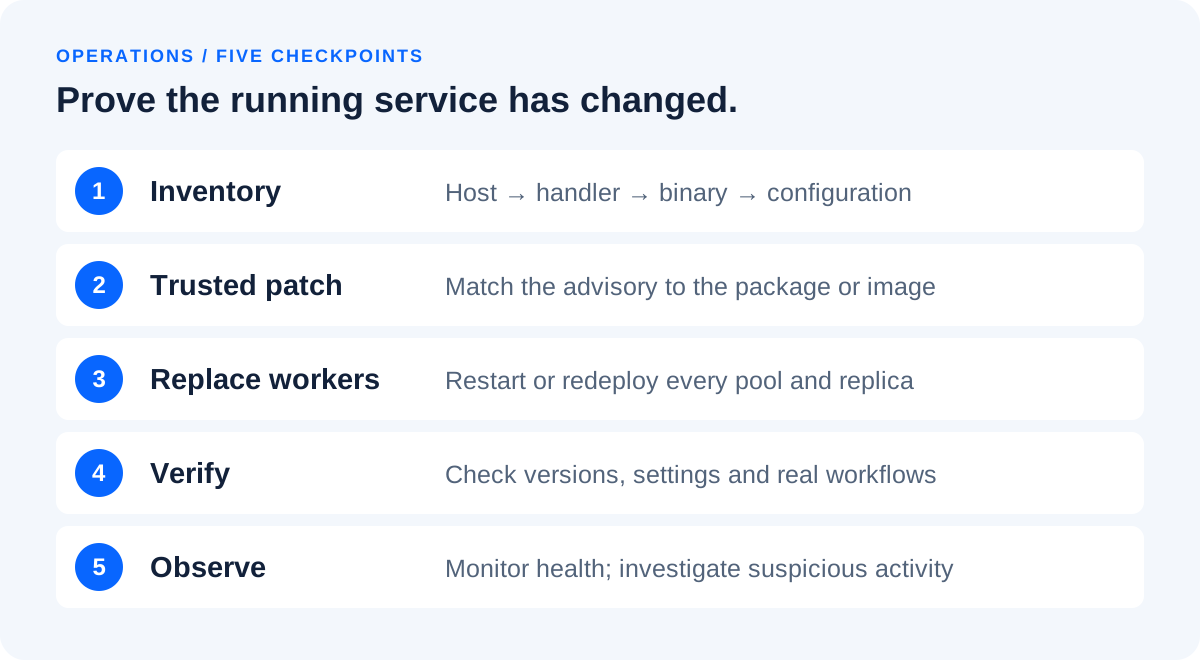
Repeat checks after a scale event, rollback, server replacement or hosting migration. Infrastructure templates can reintroduce an old package source even when a currently running node is healthy. Where possible, add a deployment check that records PHP version and package provenance in the build evidence, then reject a release whose documented security baseline is missing.
A vulnerability scanner is useful for coverage and follow-up, but its result needs interpretation. Banner-only checks can miss hidden runtimes or misread vendor backports. A clean scan does not prove that no earlier compromise occurred. Conversely, a version warning should be resolved with vendor evidence, not suppressed simply because the application appears to work.
What to review in logs and monitoring
Monitor the period before and after patching. Public disclosure time is not a reliable boundary for when a system could have been targeted, and a patch does not provide a historical incident assessment. Preserve the longest relevant retention available and choose the investigation window with your security team. This article does not assert a universal first-exploitation timestamp.
Useful signals include unusual PHP worker crashes, abrupt increases in fatal errors or allocation failures, unexpected upload-processing activity, repeated worker restarts, unexplained outbound connections and changes to application files. Each signal has legitimate explanations too. Treat correlation as a reason to investigate; do not label every failed upload as a confirmed exploit.
Correlate reverse-proxy request IDs and timestamps with application logs, PHP/FPM logs, operating-system events and container telemetry. Align time zones before comparing events. An engineer in Sri Lanka may read local timestamps while a cloud platform records UTC. Note clock skew where known so that a misleading five-hour-thirty-minute difference does not distort the timeline.
Inspect sensitive changes against a trusted baseline: new executable files, unfamiliar scheduled tasks, unexpected account changes, altered deployment scripts and changed outbound destinations. Compare deployed application artifacts with your source-controlled release. Avoid editing suspicious files in place just to make the website look normal; preserve evidence and use an investigation copy when appropriate.
Do not turn on indiscriminate request-body logging as a quick diagnostic. Uploads and forms can contain passwords, personal information and business documents. Prefer metadata sufficient to correlate an event, with restricted access and retention. If deeper capture is justified, define its scope and handling with the incident owner. An investigation should not create a second unnecessary exposure of customer data.
If you suspect compromise: contain, investigate and recover
Open a separate incident-response track when evidence suggests more than attempted exploitation. A routine patch ticket answers whether the vulnerable component is corrected; an incident ticket answers what happened, what may have been accessed and whether the environment can be trusted. Keeping those questions separate prevents a successful update from prematurely ending the investigation.
- Contain exposure. Restrict the affected service at a trusted network or proxy boundary. Coordinate with operations so that essential business processes have an alternative.
- Preserve evidence. Retain relevant logs, deployment records and appropriately acquired snapshots before rebuilding. Record timestamps, operators and evidence handling.
- Establish scope. Examine accounts, application files, secrets, databases and connected systems that the worker could access. Lack of server-root privileges does not mean customer data was unreachable.
- Recover from trusted artifacts. Rebuild compromised application hosts where appropriate, use verified patched runtimes and validate restored data. Removing one suspicious file is not a complete assurance of cleanliness.
- Rotate exposed credentials. Prioritize credentials reachable from the affected process and coordinate dependencies. Perform rotation after containment or clean recovery so that replacements are not immediately exposed again.
- Validate and monitor. Confirm application behavior, access controls, patch state and monitoring before restoring full public service.
Have the incident lead coordinate legal, contractual and customer-communication decisions with qualified advisers. Requirements depend on jurisdiction, data and agreements; this technical article does not prescribe a universal notification deadline. Communicate established facts, the current impact assessment and the next update time. Avoid claiming “no data was accessed” solely because the website is now responding normally.
Review backup integrity and retention before restoring. A recent backup may contain persistence or malicious changes if the compromise predates it. Recovery planning should identify a trusted point, check for data created since that point and reconcile the business records carefully. In systems handling orders, inventory or finance, an unplanned rollback can create operational damage even when the server starts successfully.
Long-term controls that reduce the impact of the next runtime issue
After the emergency, convert the response into a routine maintenance process. Keep an inventory of supported runtimes and their owners, subscribe to the suppliers that actually provide your packages, and test security updates before the next incident forces a hurried decision. Measure the time between a vendor fix becoming available and all relevant production instances reaching the accepted state.
Reduce the web worker's authority. Give each application the minimum database permissions it needs, avoid sharing powerful credentials across unrelated systems, and restrict writable paths. Separate customer applications where practical. Do not mount a container-management socket into a public application merely for convenience. Review outbound connectivity according to the services the application genuinely uses.
Keep public upload storage and executable code deployment separate. Apply file-type and size validation appropriate to the business, but also configure the server so that uploaded material cannot become executable application code. Maintain immutable or reproducible deployment artifacts so that an unexpected change is detectable and recovery does not depend on manually repairing a live directory.
Build a useful minimum monitoring set: service health, worker failures, resource pressure, deployment changes and security alerts with clear ownership. Exercise the escalation path. An alert that goes to an unmonitored mailbox does not provide meaningful protection. Record how to isolate a node, serve a maintenance page, restore a backup and verify a corrected runtime.
For Sri Lankan businesses using outsourced development or overseas hosting, make responsibility explicit. Ask whether the maintenance agreement covers the operating system, PHP runtime, framework, plugins, backups and incident response. A website design contract does not automatically answer those operational questions. Keep emergency contacts accessible outside the affected website and specify the time zone used in maintenance communications.
Useful tools, common mistakes and an evidence-based closure record
| Tool or evidence | Useful for | Does not prove |
|---|---|---|
| PHP CLI and configuration commands | Identifying a local binary and loaded configuration | That the HTTP pool uses the same binary |
| Vendor package advisory | Confirming a distribution backport | That every running worker has restarted |
| Image digest and rollout status | Tracking a reproducible container release | That all separate workloads share that release |
| WAF telemetry | Understanding blocked or suspicious requests | Complete protection from all runtime paths |
| Dependency scanner | Finding known component warnings | Absence of an earlier compromise |
| Backup restore exercise | Testing recovery capability | That every backup is free of malicious changes |
Common mistakes include updating only the CLI package, refreshing a container tag without recreating the workload, changing a config file used by the wrong SAPI, relying on a plugin update, assuming a WAF removes the need to patch, and closing the ticket after testing one load-balanced node. Another mistake is publishing a blanket “all clear” while an unmanaged legacy subdomain remains online.
Use a closure record that another engineer can audit: affected asset list, CVE scope, artifact evidence, effective runtime verification, worker replacement, application tests, investigation outcome or open investigation reference, temporary-control status and the responsible approver. Keep CVE-2026-115560 explicitly separate if its review remains open. This makes “patched” a verifiable state rather than an informal chat message.
Keen Systems can help scope a security review, plan application maintenance and improve deployment and infrastructure workflows. Share the hosting type, PHP branch and business impact through the contact page; do not send passwords or full environment files. Any remediation engagement should begin with a documented system scope and the permissions needed to work safely.
Frequently asked questions
Does updating WordPress or Laravel fix PHP2Shell?
Not by itself. The PHP runtime is supplied by the hosting platform, operating-system package or container image. Update that runtime and verify the web-serving workers; maintain framework and CMS updates as a separate task.
Which upstream PHP versions fix the original two CVEs?
The emergency fixes are 8.2.35, 8.3.36, 8.4.27 and 8.5.12 in their respective branches. Distribution backports require vendor-specific package evidence. These baselines concern CVE-2026-109618 and CVE-2026-109619, not every later advisory.
Is CVE-2026-115560 the same issue?
No. Track the October 23 session-upload-progress notice separately. Review the unusual serializer-change condition described by PHP and retain the recommended upload-progress control where applicable. As of the October 24 review, that notice had not identified a corrected release for this separate condition.
Is a website safe if it has no visible upload form?
A missing upload button is not runtime patch evidence. Review the server's actual request-processing configuration and verify a corrected runtime rather than making a safety claim from the page design.
Is a WAF or CDN enough?
Use it as a layer of containment and monitoring. It does not replace a verified runtime correction, and an exposed origin or alternate hostname may bypass the intended edge path.
Why does my vendor-patched PHP display an older version?
Distributions can backport a fix into an older base version. Compare the full package revision, repository and operating-system release with the supplier's security notice instead of checking only the first version numbers.
Why must workers be replaced after an update?
Installing new files does not establish that existing long-running processes are executing them. Follow the service's restart or rollout procedure and verify each pool or replica that handles traffic.
Does a patched version prove my site was never hacked?
No. Patch verification and incident investigation answer different questions. Review relevant evidence and preserve logs when compromise is suspected; a working website is not proof that no data was accessed.
Can Redis, browser cookies or HTTPS fix a PHP memory vulnerability?
No. Caching, session controls and encrypted transport solve different problems. They may improve a system's overall design but do not replace corrected PHP runtime code.